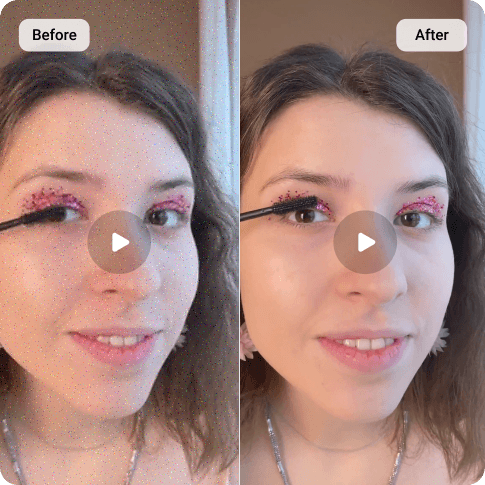
Twitter(X) Video Upscaler
X (formerly Twitter) has its own compression algorithm that may ruin your video quality. Finding a solution for this? Artguru’s Twitter video upscaler can recover lost details, remove pixelation, and export 1080p or 4K right in your browser.
Core Features of Our Twitter Video Enhancer
 True HD and 4K Resolution
Instead of simply stretching the dimensions, the system analyzes frame data to natively increase your footage’s resolution up to a crisp 1080p or 4K, which is ideal for professional social media feeds.
 One-click Enhancement
Experience instant AI video enhancement with Artguru. Whenever you are ready, all you need to do is click the “Start” button to let the magic happen. You can let it there for us or even close the tab. Artguru’s technology will handle the rest and deliver a more sharp and clear video to you.
 Background Processing Capability
High-resolution rendering takes computational power. Artguru allows you to close your browser tab entirely while the enhancement runs on our servers, freeing up your local device’s resources.
 Secure and Private File Handling
Your media remains strictly yours. Uploaded files are processed securely within our cloud infrastructure, and only you have access to them.
How to Upscale Twitter Video Quality with Artguru

Step 1. Upload Your Video
Drag and drop your video (MP4 or MOV file) into Artguru’s Twitter Video Upscaler. Your video should be under 1GB and less than 20 minutes in length.

Step 2. AI Enhancing
Choose 4K Resolution and click “Start” to initiate the 4K video enhancement. During this process, your progress is automatically saved in the Artguru Library, so you can safely leave our page and do your own stuff.

Step 3. Preview and Download
When the process is complete, you can watch the video with our before-and-after comparison tool. It’s a great way to preview the results with ease before downloading it to your device.
What Makes Your Twitter (X) Videos Look Pixelated?
Like many other social media platforms, Twitter has a built-in compression algorithm which reduces the file size of your videos for better performance and optimization. However, this compression process normally results in a loss of quality and details, making your videos look blocky or pixelated. Even originally being recorded and uploaded in HD, your video still looks degraded and blurry. Our Twitter video upscaler will fix this problem by reconstructing the damaged data and sharpening your video for a better viewing experience.
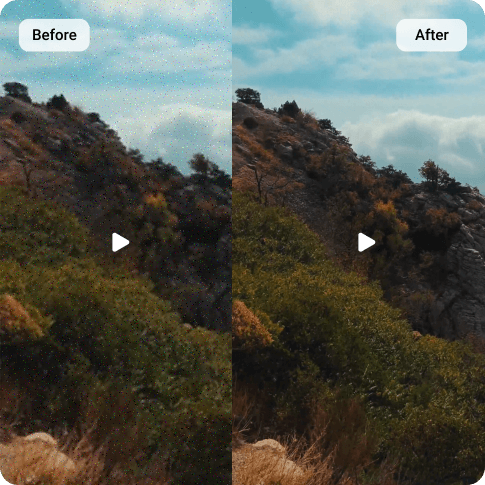
Upscale Twitter Videos to HD or 4K Resolution
Whether you are a brand manager trying to maintain a professional image or a content creator sharing detailed gaming clips, clarity matters. When you upscale Twitter video files with Artguru, the result you get will never let you down. It is noteworthy that because high-fidelity rendering requires substantial computational power, this feature works on a credit system. So, if you need serious quality improvements, Artguru will definitely satisfy your needs right from the beginning.

Remove Pixelation and Blur from Your Twitter Videos
Blurry footage isn’t just a resolution issue; it is a noise and artifact problem. As a comprehensive Twitter video enhancer, Artguru targets the specific visual degradation caused by heavy social media compression. Before saving the file via a Twitter video downloader and committing your account credits to a final download, you can utilize our built-in preview comparison feature to ensure the blur has been cleared and the edges are sharpened to meet your standards.
What Our Happy Customers Say

Ellis Hughes
Twitter always destroyed our campaign teasers. I started running them through Artguru to get a 4K baseline first. It costs credits depending on the length, but the final clarity on the timeline is much better now. It worths every penny!
Aiden Gordon
I accidentally lost one of my original videos while editing. All I got was the blurry version that I posted previously on Twitter. To my surprise, it seems to me that I find the original video again after using Artguru. The pixalation is practically gone after the upscaling process.
Taylor Harvey
Artguru is working like a god-like tool for me. I don’t need to leave my laptop open for hours just to fix a blurry clip. It works in the background and even not in my browser. That means I can close the tab and come back later when the enhancement is done.
FAQs about Twitter Video Upscaler
Artguru’s video enhancer always strives to provide the best quality content for all users. We prioritize the quality and accuracy in our system. Therefore, instead of providing it for free with disappointing results, we offer a premium service for serious users like you, who are willing to value your time and effort.
We support file formats like MP4 and MOV. Your video should less than 1GB and under 20 minutes of duration.
Currently, Artguru does not support batch processing for videos. To maintain the highest quality output and ensure stable rendering, files must be uploaded and enhanced one at a time.
No. Every enhancement process on Artguru was designed carefully to maintain the consistency for your own workflow. So, you will get your final video in the exact same file format. For example, you upload a MP4 video to Artguru and will receive a MP4 file output after the process.
No. All rendering happens in the background on our secure servers. You are completely free to close the tab or your browser entirely and return later to view your completed results.
After the processing is complete, you can review both before and after versions with our side-by-side preview comparison tool before downloading it for later use.