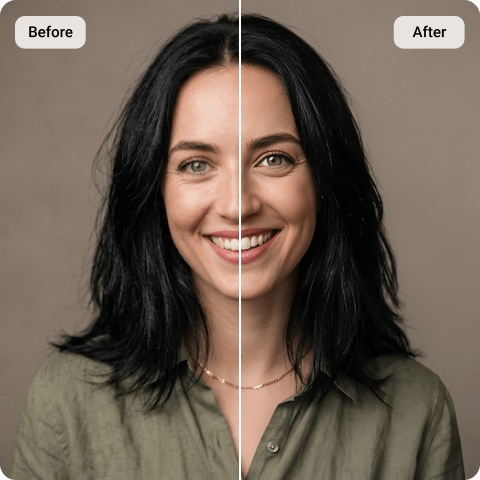
Gemini AI Photo Enhancer
If you’ve been creating visuals with Gemini and noticed the edges look kind of soft, or details feel slightly off, you’re not imagining it. It happens. AI images can look amazing, but sometimes they lack that final crispness. Artguru’s Gemini AI Image Enhancer steps in here. It analyzes the image, refines textures, boosts clarity, and doesn’t ruin the original style in the process. It enhances without overdoing it, which is honestly important.
How to Enhance Gemini Images Online?

Step 1. Upload your Gemini image
Download the AI image you generated from Gemini and upload it into Artguru’s our image enhancer. It supports most common formats, and works fine whether your image is more illustrative or photorealistic. Pretty straightforward so far.

Step 2. Let the AI analyze it
Once uploaded, the Gemini AI image enhancer automatically detects blur, noise, and compression issues. It sharpens edges, restores missing details, and cleans things up – but without making it look overly processed. That fake “crispy” look? It avoids that.

Step 3. Preview and download
You’ll see a before-and-after comparison. If you like the result (you probably will), just download the higher-resolution version.
Gemini AI Photo Enhancer Features That Matter
 Smart Detail Restoration
Gemini-generated images sometimes appear slightly soft. This is especially common in complex areas like hair, fabric textures, or distant backgrounds. Artguru’s Gemini image enhancer virtually enhances micro-details while maintaining the original composition and style.
 Advanced Denoising and Deblurring
AI-generated visuals may contain slight noise or compression artifacts. The enhancer subtly reduces grain, corrects blur, and refines outlines, producing a cleaner and more polished result.
 High-quality Image Upscaling
Whether you need images for social media, presentations, or print, resolution always matters. Artguru allows you to easily upscale images, all while maintaining their visual consistency! That means no degradation of image upon sharing on different platforms. The image remains sharp and blur-free!
 Security and Privacy Protection
Your images are processed securely. Artguru does not claim ownership of any uploaded files, and processing is handled with user privacy in mind. You remain in control of your content at all times!
Why are Gemini-generated Images Blurry?
Gemini, developed by Google, is primarily known for advanced AI capabilities across text and visuals. When it generates images, it relies on pattern prediction and pixel estimation — not actual camera capture.
That means sometimes images may look slightly soft around edges, or may be missing fine texture details. The image may also be affected by compression with a lower resolution than expecte. This is normal for AI-generated visuals.
Instead of regenerating the entire image from scratch (which can change everything), Artguru’s Gemini AI photo enhancer improves what’s already there. It sharpens, denoises, and upscales the existing output., while mantaining the style, color, and brightness of the image. Sometimes that’s all you really need.

Gemini Photo Enhancer Online – No Installation Required
One of the fundamental advantages of Artguru’s solution is convenience. You don’t need to download software or configure complicated settings. The Gemini AI Photo Enhancer works directly in your browser! No software installation or technical setup is required. Fast processing occurs in mere seconds and the software is highly compatible with desktop and mobile browsers.
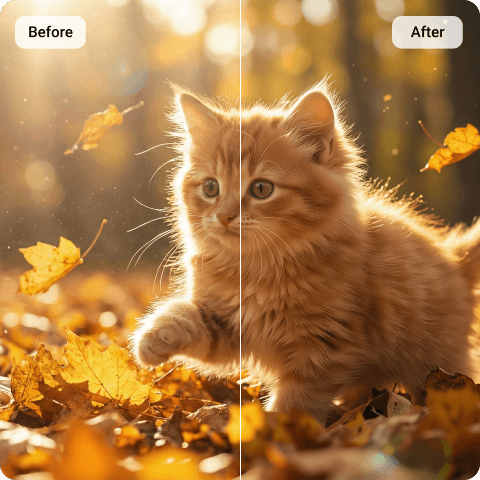
Gemini Image Enhancer Powered By Advanced AI
Our Gemini photo enhancer uses highly trained AI image enhancement tecnology to carefully analyze image structure at multiple levels. It identifies blurred edges, noise patterns, missing fine details, and low-contrast areas.
The system then applies targeted corrections. This includes denoising flat regions, sharpening contours, and restoring natural textures. The goal is to obtain balanced enhancement. Instead of oversharpening or creating artificial-looking edges, the tool preserves the original mood and artistic direction of the Gemini image.
Ultimately, this makes it suitable for concept illustrations, AI artwork, marketing visuals, portrait-style AI images and blog graphics. Basically, anything you generated with Gemini that needs a bit more clarity.
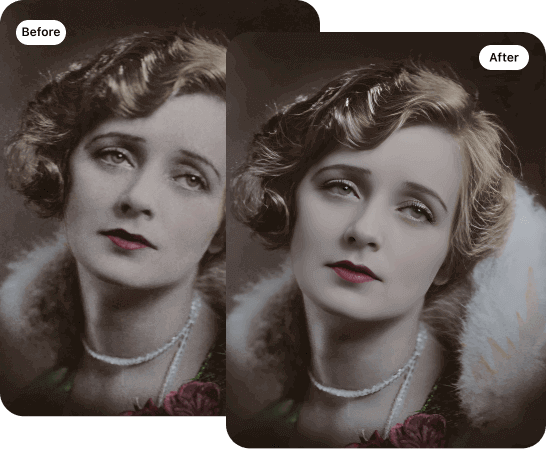
Upscale Gemini Images Without Losing Quality
Sometimes enhancement alone is not enough. You may need a larger file size for printing or professional publishing. Our Gemini image enhancer can efficiently increase resolution while minimizing any quality loss. It carefully reconstructs missing pixel data using AI-based prediction models. This helps to maintain original colors, shapes, and lighting consistency.

Enhance Gemini Images on Mobile (iOS and Android)
Artguru also offers a mobile app that is compatible with both iOS and Android devices. This allows Gemini app users to enhance images directly from their phones. With the mobile version, you can instantly upload Gemini generated images, enhance to HD, 4K or 8K resolution, download and share in seconds, and edit images anytime, anywhere! Whether you are creating AI visuals for social media or quick design concepts, the mobile app ensures that your Gemini AI photo enhancer workflow stays efficient on the go.
What Our Happy Customers Say

Emily R.
I use Gemini to generate blog visuals, but some images look a bit soft. Artguru’s enhancer made them sharper without changing the style. It’s quite simple and practical.
Ethan M.
I needed higher resolution AI artwork for print. The upscaling result was surprisingly clean! It didn’t look too over-processed, which I really appreciate.
Sophia V.
I don’t have advanced editing skills, so an online Gemini photo enhancer was exactly what I needed. Upload, enhance, download. It’s pretty straightforward.
Gemini AI Photo Enhancer FAQs
What is Gemini AI photo enhancer?
A Gemini AI photo enhancer is a tool designed to improve images generated by Gemini. It refines clarity, sharpens edges, and reduces noise. The tool can increase resolution without requiring you to regenerate the original AI image.
Gemini primarily focuses on generating content, including images. However, it is not specifically built as a dedicated photo enhancer. If you require sharpening, denoising, or upscaling of an image, a Gemini photo enhancer like Artguru provides more targeted results.
Gemini is not designed as a professional image upscaling solution. It can generate visuals. But increasing resolution without quality loss requires a specialized AI upscaling system.
Yes! You can upscale Gemini-generated images using a powerful AI upscaler. Artguru’s Image Upscaler lets you upscale images to 8K while maintaining detail and style consistency. This makes the tool suitable for high-resolution displays or print projects.
If you regularly generate AI visuals and want sharper and clearer results, a reliable Gemini AI photo enhancer can dramatically improve your workflow! Artguru offers a balanced, user-friendly solution focused on practical enhancement; ultimately helping your AI images look more refined, detailed, and ready for real-world use!